
By the end of the lesson, you would understand what the paragraph element is, how to use it, what the poem problem is, and 2 ways to solve it.
The paragraph element is used to create paragraphs in your webpage. As with many other elements, the paragraph element comes with an opening (<p>) and a closing tag (</p>).
The opening tag shows where the paragraph starts, the closing tag shows where the paragraph ends.
The code snippet below shows how to use the paragraph element:
<p>This is a paragraph. HTML makes it so easy to create one</p> A paragraph in HTML
Did you notice the space before the paragraph? The browser automatically adds some space (margin) at the top and bottom of a paragraph. Later when learning about CSS, we'll see how to increase, decrease and remove the space (margin) around an element
Using the paragraph element, you can structure text across your webpage into readable sizes. Your paragraph can contain a single sentence as in the code sample above, or it can contain as many sentences as you want (as in the example below).
<h1>Twinkle Twinkle Little Start</h1>
<p>Twinkle Twinkle little star,
How i wonder what you are,
Up above the world so high,
Like a diamond in the sky,
Twinkle Twinkle little star,
How i wonder what you are
<p>
 The poem is displayed in the same line
You can also have as much paragraphs as you need in your webpage, it all depends on how you want the text in the webpage to be structured.
knowing how a paragraph works, consider this...
Should you have a heading inside a paragraph element?
<p>The most common english poem in the world
<h1>Twinkle Twinkle Little Start</h1>
Twinkle Twinkle little star,
How i wonder what you are,
Up above the world so high,
Like a diamond in the sky,
Twinkle Twinkle little star,
How i wonder what you are
</p>
No, Just as you wouldn't have a heading in a paragraph when writing (or typing) a written document, you shouldn't have that in your html markup
Should you have a paragraph element inside a paragraph element?
<p>The most common english poem in the world
<p>Twinkle Twinkle little star,</p>
Up above the world so high,
Like a diamond in the sky,
Twinkle Twinkle little star,
How i wonder what you are
</p>
No, simply create a seperate paragraph or allow the text to continue in the same paragraph element
The Poem Problem in HTML
<h1>Twinkle Twinkle Little Start</h1>
<p>Twinkle Twinkle little star,
How i wonder what you are,
Up above the world so high,
Like a diamond in the sky,
Twinkle Twinkle little star,
How i wonder what you are
<p>
Consider the output from the code snippet above...
The poem is displayed in the same lineIn the output, the entire text in the paragraph did not go in their own seperate line as written in the code.
In the code, each line of the poem is written in a new line, but in the output, its all put together.
This is a problem with the paragraph element called the Poem problem.
By default, HTML paragraph element ignores, extra spaces and line breakes ( which are very common in poems). So even if you add them in your code (as done in the example above), the browser is going to ignore them.
So how is this problem solved?
Using the <br> Tag
One way is to use the Line Break element (<br>). You can simply add the line break before any sentence you want to start in a new line.
<h1>Twinkle Twinkle Little Start</h1>
<p>Twinkle Twinkle little star,<br>
How i wonder what you are,<br>
Up above the world so high,<br>
Like a diamond in the sky,<br>
Twinkle Twinkle little star,<br>
How i wonder what you are
<p>
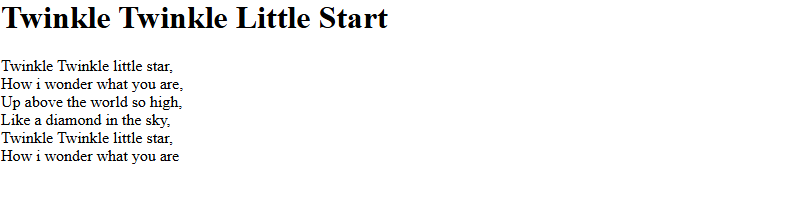 Each line is now displayed seperately
The line-break tag (<br>) is a self-closing tag. It doesn't need a partner
Using the <pre> Tag
Another way is to use the preformated-text tag (<pre>) in place of the paragraph.
<h1>Twinkle Twinkle Little Start</h1>
<pre>
Twinkle Twinkle little star,
How i wonder what you are,
Up above the world so high,
Like a diamond in the sky,
Twinkle Twinkle little star,
How i wonder what you are
</pre>
 The pre tag displays the text as is written in the code
This element tells the browser to display the text exactly as its written in the code - with the new lines and extra spaces.
The formatting of the text in the <pre> element is displayed a bit differently from the other text elements by default. Don't worry, that can be changed using CSS. We'll do so in later lessons. For now, let's understand how to structure our HTML pages using the right elements.
Remember, if you're using this, use it in place of the paragraph element not inside of it.
When should you use each?
Use the paragraph element (<p>) when you want to write:
- articles
- explanations
- blog content
- comments
- descriptions
- regular prose
When your browser sees it, it removes the extra spaces and manual line breakes and wraps the text together. This is good for normal reading content.
Use the <pre> element when you want to write text that must preserve its formatting exactly as you typed it. It preserves
- spaces
- tabs
- indentation
- line breakes
Use it for:
- Poems
- code snippets
- texts where the spacing matters
Don't simply use the preformated-text element (<pre>) because of how the text is displayed!. Using tags simply for how they are displayed causes your browser and search engines to misunderstand your webpage.
And that's it for the paragraph element. Now that you know how the paragraph element works, the poem problem and how to solve it, and also when to use the preformatted text (<pre>) element over the paragraph element (<p>), next let's talk about a tool specifically designed to make it easier for you to write code.