
This is a brief description of what HTML is and why we need it. If you're new to HTML this brief intro is exactly what you need to help you understand what HTML is and why we need it.
HTML stands for Hypertext markup language. It is the standard markup language for building webpages. Hypertext? Markup? What does all that mean? Let’s get into it.
What is Hypertext?
Hypertext simply means a piece of text that links to another piece of text, document, image, audio or any other file format. In HTML, Hypertext is colored and underlined blue by default. The image below shows what I’m talking about.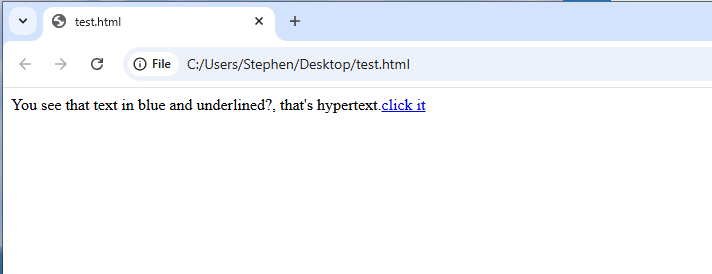 Hypertext link 'click it' that links to another page
HTML was created by Tim Bernace Lee in 1991. Before HTML, documents were stored on different computers (and sometimes unorganized). This required people to look through different computers to find different pages of a document collection. To solve this problem, HTML was created. HTML provides a way (Hypertext) to link to different documents from a single webpage without having to look through several computers first
What is markup?
Markup simply means adding extra meaning or value to a piece of text. It’s just like when you’re reading your favorite book and you choose to highlight a piece of text using yellow color. For you,- the color yellow might mean something you want to apply.
- Green might mean something you don’t want to forget.
- Red might mean something you want to avoid.
 Just as you highlight text in your favorite book to add extra meaning to the text, so also the browser uses tags to understand exactly what a piece of text should be
Whichever color code works for you, by adding the color highlight, you’ve added extra meaning (for you) to that piece of text- you marked-up the text. In HTML, we use tags to markup text. Don’t worry we’ll talk more on tags shortly. For now, just know that tags help us to markup a piece of text so the browser can understand (gain meaning) what the piece of text is supposed to be. With a tag, you can tell the browser this piece of text should be
- a paragraph (like the one above this list),
- a link (like this one that links back to this page),
- a button ,
- a list like this one,
- a video or audio player and so much more.
Why do we need HTML?
Just as bricks are used to structure a house, so also HTML is used to structure webpages. By means of HTML, we can tell the browser exactly what each component of the webpage should be. Today, HTML has become the standard foundation for every single webpage you can think of.There have been several versions of HTML up until now. The current version of HTML is the HTML Living Standard."HTML living standard" simply means new features are added when they're ready rather than waiting for new major realeases (e.g 6.0, 7.0, and regular numbered versioning).The last numbered major version of HTML is version 5.0
What are HTML tags?
HTML tags are special components of HTML that are used to structure a webpage. By means of tags, you can tell the browser(markup) exaclty what a piece of text should be displayed as - a paragraph, a button, an audio player and many other things.Every HTML tag
- starts with a less than sign (<),
- followed by the tag name (e.g p, button, section, e.t.c),
- and then the greater than symbol (>)
For example please consider the following HTML tags below:
- The paragraph tag (<p>)
- The button tag (<button>)
- The section tag (<section>)
Also, many of the HTML tags come in pairs- an opening and a closing tag. The tags listed above are actually opening tags. The closing tags are written exactly the same way as the opeining tags but with one small differentiator - a foward slash before the tag name. Using the same set of tags as listed above, this would be their closing tags:
- The paragraph tag (</p>)
- The button tag (</button>)
- The section tag (</section>)
So, if you want to create a paragraph in HTML, you should do this:
<p>Thank you Tim Bernace Lee</p>When the browser sees this piece of text, it would understand the text 'Thank you Tim Bernace Lee' should be displayed in a paragraph.
If you want to create a button in HTML, you should do this:
<button>Buy now</button>When the browser sees this piece of text, it would understand the text 'Buy now' should be displayed as a button.
These are just a few examples to help you see how tags are used. HTML is very cool, you’ll love it!
With all that said, HTML is the standard markup language that helps us to create webpages. By means of HTML, browsers can understand how a page is structured and display a page consistently. Now that you know what HTML is, next we'll talk about how you can create an HTML document, and start using some tags.